Loading Progress Bar Set - Jolin Theme
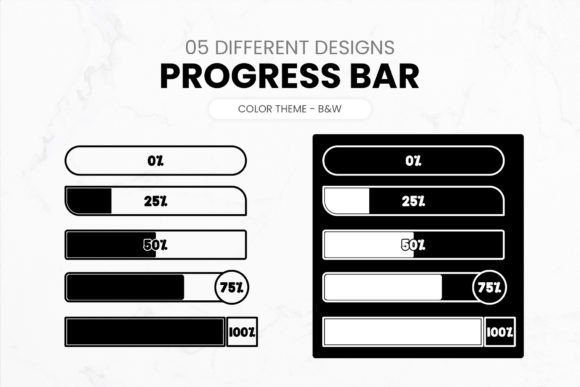
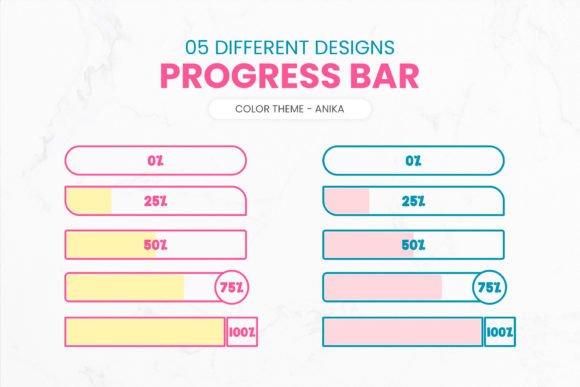
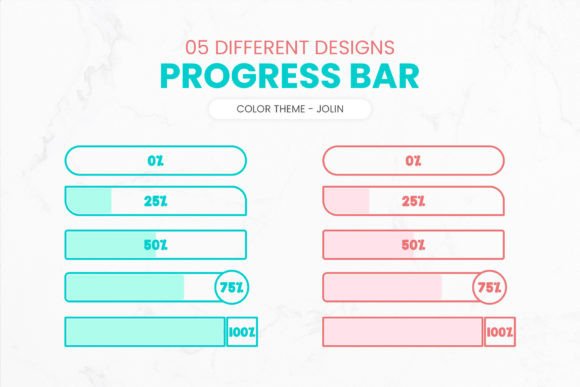
When it comes to digital design, every detail matters. One often-overlooked element is the loading progress bar. These subtle visual cues not only inform users about the status of a process but also contribute significantly to the overall user experience and aesthetics of your project. That’s where the Loading Progress Bar Set - Jolin Theme shines. This set offers five distinct designs in two color themes, all rendered in high-quality PNG format at 300 DPI with transparent backgrounds—making them incredibly versatile for any creative endeavor.
What Makes This Set Stand Out?
The Loading Progress Bar Set - Jolin Theme is more than just a collection of graphics; it's a toolkit for designers who want to add a touch of professionalism and polish to their interfaces. Here are some key features that make it an excellent addition to your design arsenal:
- Five Unique Designs: Whether you're working on a website, app, or presentation, these varied styles ensure there's a perfect fit for your vision.
- Two Color Themes: The dual-color options allow for easy integration into both light and dark mode UIs, maintaining consistency across platforms.
- High Resolution (300 DPI): Crisp visuals at any size, ideal for print and digital use alike.
- Transparent Backgrounds: Seamless layering over any image or background without worrying about clashing colors or textures.
This attention to detail makes the Jolin Theme set particularly appealing for those aiming to create visually cohesive and professional projects without spending hours designing from scratch.
Designers: Elevate Your Projects
If you're a designer working on web or mobile applications, this set can be a game-changer. Imagine developing a sleek dashboard where each loading state is accompanied by a progress bar that matches the brand’s identity. With the Jolin Theme, you can quickly swap out default browser-style loaders with something custom yet refined.
For example, when creating a landing page for a tech startup, you might pair one of the minimalist progress bars with a modern sans-serif font and soft gradients. It adds a level of sophistication that speaks volumes about the company’s attention to detail and design maturity.
Freelancers can benefit by offering clients a choice of styles, giving them the flexibility to match the progress bar to the specific tone and branding of their project. It's a small change that can have a big impact on perceived quality and user satisfaction.
Marketers & Bloggers: Enhance User Engagement
Progress bars aren’t just for developers. Marketers and bloggers can leverage them in email campaigns, lead magnets, or interactive content like quizzes and calculators. A well-placed progress bar can guide users through a multi-step form or encourage them to complete a survey by showing how much they've already accomplished.
Consider using one of the Jolin Theme’s animated-looking progress bars during a webinar registration process. As participants fill out each section, the bar fills up, providing a satisfying visual cue that keeps them motivated to finish. You could even customize the color theme to reflect your campaign’s branding—like using warm oranges and yellows for a summer promotion or cool blues and greens for a wellness-related quiz.
With transparent PNG files, you can overlay the progress bar onto your hero images or branded templates without disrupting the visual flow. It’s a smart way to maintain engagement while keeping your message clean and focused.
Entrepreneurs & Small Business Owners: Save Time, Deliver Quality
Running a business means juggling many tasks, and time is always a constraint. If you’re building your own website or managing a Shopify store, having ready-to-use assets like the Jolin Theme progress bars can help streamline your workflow.
These bars are especially useful in e-commerce contexts. When customers are waiting for their orders to load or for payment processing to complete, a stylish progress bar can reduce anxiety and keep them on the page longer. Choose a design that aligns with your brand’s personality—whether it's bold and energetic or calm and professional—and watch how it subtly improves user interaction.
You can also use these progress bars in downloadable resources such as PDF guides or templates. For instance, if you offer a free checklist, include a progress bar in the file to show completion stages. It adds a dynamic feel to static content and helps users track their progress.
Educators & Hobbyists: Teach and Learn Through Visuals
Educators can incorporate these progress bars into online learning modules or course dashboards to help students visualize their progress through lessons. A simple horizontal bar can represent the percentage of material completed, encouraging learners to push forward.
Hobbyists and DIY creators will appreciate the clarity and adaptability of the Jolin Theme set. If you're making a tutorial video series or a step-by-step blog post, adding a progress bar to each section can help viewers stay oriented. You might even animate the bar manually using slide transitions in PowerPoint or Google Slides to simulate real-time progress.
Because these PNGs are resolution-independent and come in multiple styles, they’re great for educational materials that may need to be printed or shared digitally. Just drop one into your layout and adjust the size—no pixelation, no hassle.
Web Developers: Boost UI/UX Without Overcomplicating
Web developers looking to enhance their site’s UI/UX can integrate these progress bars effortlessly. They’re pre-made, so you don't need to code complex animations or spend extra time on graphic design. Simply place the PNG into your HTML/CSS structure and style it as needed.
Here’s a quick tip: Use the Jolin Theme progress bars in conjunction with JavaScript to update dynamically based on user actions. For instance, when a user uploads a file or completes a form field, trigger a script to increase the bar’s fill width. This gives your interface a polished, responsive feel without requiring advanced coding skills.
Even if you're working with limited frameworks or CMS platforms, the transparency and high resolution of these bars ensure they’ll look great regardless of the background they’re placed on. This adaptability is invaluable when dealing with unpredictable client preferences or template constraints.
Content Creators & Publishers: Keep Audiences Hooked
Content creators who work with long-form articles, tutorials, or serialized guides can use these progress bars to break down content visually. Think of it as a roadmap for readers—each segment represents a new section or chapter, helping them understand the journey ahead.
For publishers, including a progress bar in a magazine-style digital publication can mimic the experience of flipping through physical pages. It adds a sense of progression and accomplishment, especially for in-depth stories or reports.
Try embedding one of the Jolin Theme’s vertical progress bars alongside a scrollable article. As users move down the page, the bar fills, signaling how far they’ve read and how much remains. It’s a clever trick that works particularly well on blogs or news sites with lengthy content.
Styling Tips for Maximum Impact
To get the most out of your Loading Progress Bar Set - Jolin Theme, consider these practical styling suggestions:
- Match Brand Colors: Use the two available color themes to align the bars with your brand palette. Even minor tweaks in hue can dramatically improve cohesion.
- Combine with Icons: Pair the progress bars with relevant icons—such as checkmarks, clocks, or arrows—to reinforce the message being conveyed.
- Use Subtle Animations: While the PNGs themselves are static, you can apply CSS transitions or JavaScript to create smooth, engaging animations that mimic movement.
- Scale Appropriately: Because they’re created at 300 DPI, you can scale the bars up or down without losing quality. But remember to balance their size with the surrounding elements for optimal readability and aesthetics.
- Layer Thoughtfully: Place the bars where they won’t obstruct important information. Use z-index or opacity settings to ensure they blend naturally into the design.
By thoughtfully integrating these progress bars into your layouts, you can transform functional elements into design highlights that elevate your entire project.
Where to Use the Jolin Theme Progress Bars
The beauty of this set lies in its broad applicability. Here are a few scenarios where you can put them to good use:
- Websites: Loading indicators during page transitions, form submissions, or media loads.
- Mobile Apps: In-app progress for downloads, installations, or task completions.
- Presentations: Show progress through slides or sections to keep the audience engaged.
- Email Campaigns: Add a sense of motion to autoresponders or multi-part newsletters.
- Print Materials: Use the static versions in brochures, infographics, or instructional manuals.
No matter the medium, the Jolin Theme ensures you have the right tool for the job. Its diverse designs mean you can choose between a sleek line, a segmented bar, or a more abstract representation—depending on what fits best with your layout and message.
Final Thoughts on Creative Application
In the world of design, it’s the little things that make the biggest difference. The Loading Progress Bar Set - Jolin Theme isn’t flashy, but it’s functional, flexible, and beautifully crafted. It’s the kind of resource that empowers creators to focus on bigger ideas while still delivering a polished end product.
Whether you're refining a corporate website, crafting an engaging blog post, or building an interactive app, these progress bars provide a reliable, reusable solution that blends creativity with usability. Their transparent nature and high-resolution output make them adaptable to almost any background or platform, which is essential for modern, responsive design.
So the next time you’re looking to add a bit of elegance to a loading screen or a quiet boost of interactivity to your content, remember the Jolin Theme set. It's not just a visual enhancement—it's a thoughtful design choice that speaks to your commitment to quality and user experience.
Get Inspired, Stay Productive
Explore the possibilities with the Loading Progress Bar Set - Jolin Theme. Let it spark your creativity while saving you valuable time. Whether you're a seasoned designer or someone just starting out, these assets are a smart investment in your visual toolkit.