Text Tail: A Creative Tool for Designers
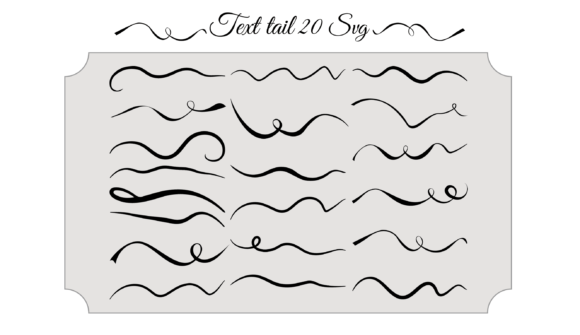
Text Tail is a unique collection of 20 calligraphy-style SVG elements designed to enhance the visual appeal of text in graphic design. These tails are often used to decorate the end of letters or words, giving them a more elegant and artistic touch. Whether you're working on a logo, blog post, marketing material, or personal project, Text Tails can help elevate your typography with a signature flair.
What Makes Text Tail Special?
The beauty of Text Tail lies in its use of Scalable Vector Graphics (SVG) format. This means that every tail is crisp, clean, and maintains high quality no matter how large or small it's scaled. Unlike raster images, which can become pixelated when resized, SVG ensures that each line and curve remains sharp and clear. This makes Text Tail an excellent choice for both digital and print projects where precision and adaptability are key.
Why Designers Love SVG Elements
- Scalability: Perfect for responsive web design or large-format printing.
- High Quality: No loss of resolution at any size.
- Customizability: Easily editable using vector software like Adobe Illustrator or Inkscape.
- Lightweight: SVG files are typically smaller than other image formats, improving load times on websites.
Who Can Benefit from Text Tail?
Text Tail isn’t just for professional designers. Its versatility allows a wide range of users to incorporate it into their work depending on their goals and needs. Here’s how different audiences might find value in this set:
Beginners & Hobbyists
For those new to graphic design, Text Tail offers an accessible way to add creativity without requiring advanced skills. The ready-made SVG files mean you don't need to draw intricate calligraphy from scratch. Simply apply one of the 20 designs to your text and watch your project transform.
Example: A hobbyist creating a handmade birthday card can use a Text Tail to make the recipient's name stand out with a personalized flourish.
Professionals & Creators
Experienced designers and content creators often look for tools that save time while maintaining quality. Text Tail provides a quick yet refined solution for adding decorative touches to headlines, brand names, or even editorial illustrations. It’s especially useful for those who want to maintain a consistent style across multiple platforms or projects.
Example: A freelance designer crafting a website header could use a Text Tail to give the headline a handwritten feel, aligning with a brand’s creative identity.
Entrepreneurs & Small Business Owners
Business owners focused on branding will appreciate the ability to create visually compelling logos, social media posts, or packaging labels. Text Tail adds a layer of sophistication that can help differentiate a product or service in a competitive market.
Example: A boutique owner designing a product label might choose a Text Tail to give the brand name a more artisanal, handcrafted appearance.
Marketers & Bloggers
Marketing materials and blog visuals benefit greatly from a polished aesthetic. Text Tail can be used to highlight key phrases or quotes, making them more engaging for readers. The subtle elegance of these tails can also support brand messaging that values authenticity and craftsmanship.
Example: A blogger creating a quote graphic for Instagram could pair a motivational message with a matching Text Tail to increase shareability and visual appeal.
Educators & Students
Teachers and students in design courses can use Text Tail as a teaching tool or project enhancement. It introduces learners to the concept of scalable design and helps educators demonstrate how to integrate decorative elements into typography effectively.
Example: In a graphic design class, students might experiment with different Text Tails to understand how they affect the tone and readability of a headline.
Different Priorities, Same Value
While everyone can benefit from Text Tail, the reasons may vary based on individual priorities. Here’s how different user types might approach it:
Quality Over Speed
Designers who prioritize visual excellence will love the detail and clarity of SVG-based Text Tails. Each tail is crafted to look professional and timeless, fitting well into luxury branding, wedding invitations, or editorial layouts.
Speed Over Cost
For entrepreneurs or marketers under tight deadlines, Text Tail eliminates the need to commission custom calligraphy work. It’s a cost-effective shortcut to achieving high-quality design quickly, especially when used in digital assets like email headers or social media banners.
Flexibility for Customization
SVG files allow for easy customization in terms of color, stroke width, and positioning. For creators who enjoy experimenting, Text Tail becomes a canvas for innovation—whether you’re blending tails with other graphics or adapting them to match a specific theme or palette.
Long-Term Usefulness
Because SVG is future-proof and compatible with most modern design software and web technologies, Text Tail has long-term value. As trends evolve, having a set of high-quality, reusable elements gives you the flexibility to keep up without constantly starting from scratch.
How to Choose the Right Text Tail
With 20 unique designs to choose from, selecting the right Text Tail depends on your project’s purpose and audience. Consider the following tips:
- Match the tone: A bold, dramatic tail works best for logos or posters, while delicate, flowing ones suit poetry or greeting cards.
- Consider legibility: Avoid overly complex tails if the text needs to remain easily readable at a glance.
- Use sparingly: Apply Text Tails selectively to avoid overwhelming the design. One or two per piece usually have the biggest impact.
- Test in context: Try different tails with your chosen font to see what complements it best. Some fonts naturally lend themselves to certain styles.
Real-World Applications
Here are some practical ways people are using Text Tail in their everyday work:
- Logo Design: Adding a calligraphic tail to a company name creates a memorable and stylish identity.
- Social Media Graphics: Marketers use them to emphasize taglines or hashtags, drawing attention to key messages.
- Wedding Invitations: Calligraphy-style tails bring a romantic and elegant feel to handwritten names or dates.
- Book Covers: Publishers incorporate Text Tails into titles to evoke a sense of tradition or artistry.
- Signature Styles: Artists or writers use them to personalize their signatures in digital portfolios or printed work.
Is Text Tail Right for You?
If you're looking to inject a bit of personality into your text without compromising professionalism, Text Tail could be a perfect fit. Think about the type of projects you regularly work on and whether they would benefit from a more artistic or handwritten touch. If so, this set offers a convenient and beautiful way to achieve that effect.
However, if your focus is strictly on minimalism or modern sans-serif aesthetics, you might not need Text Tail. But for anyone who appreciates the charm of traditional script or wants to blend classic and contemporary styles, these tails offer endless possibilities.
Getting Started with Text Tail
Using Text Tail is straightforward. Most design software supports SVG imports, so you can drag and drop the file into your project. From there, adjust the size, color, and position to suit your layout. Many users also combine multiple tails to build custom flourishes tailored to their specific needs.
Tip: Start by applying a tail to just one letter or word to test the look before committing to the whole design. This helps ensure balance and harmony in your composition.
Final Thoughts on Text Tail
Text Tail bridges the gap between digital efficiency and artistic expression. Whether you're a seasoned designer or just starting out, it’s a resource that can inspire creativity and enhance your visual storytelling. By understanding how different users interact with it, you can better decide if it fits your workflow—and ultimately, your vision.